BUS220 - Business Intelligence and Analytics | Week 2
Oleh Omelchenko
2026-03-18
What do you remember from last week?
What is a dashboard?
What makes data “dirty”?
What was the one question this course keeps asking?
How the brain sees data
A table of numbers
Look at these quarterly sales figures. Which category grew the most? Which quarter was worst?
Category
Q1 2023
Q2 2023
Q3 2023
Q4 2023
Q1 2024
Q2 2024
Q3 2024
Q4 2024
Furniture
412
387
445
523
478
501
562
618
Electronics
891
934
872
1,105
967
1,042
1,089
1,234
Clothing
234
312
289
378
345
401
423
512
Food
567
545
598
612
589
601
634
645
Take 10 seconds.
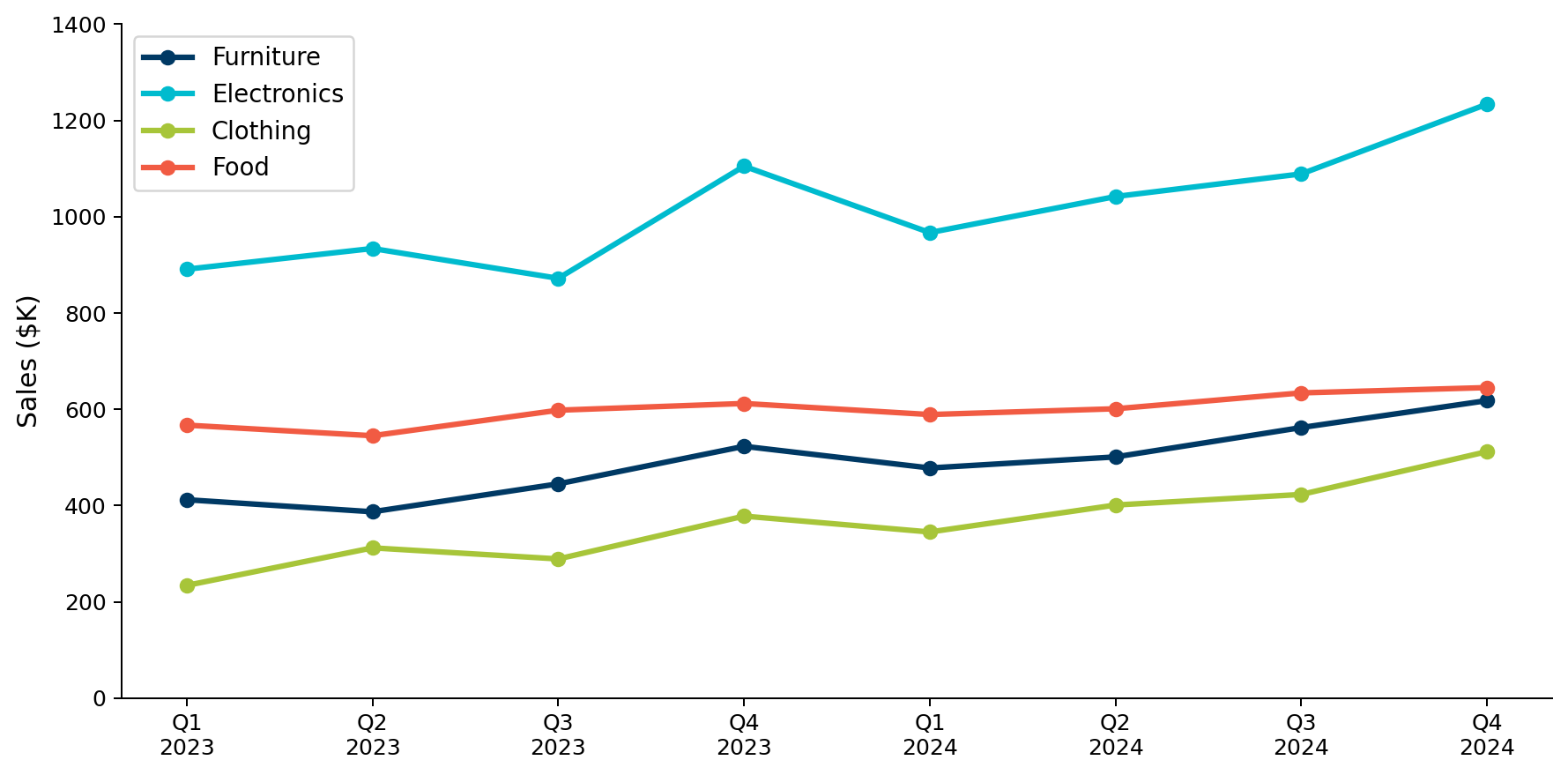
The same data as a chart
Same 32 numbers, different encoding. Growth patterns and comparisons are now obvious.
Three types of memory
How your brain processes what it sees:
Iconic (sensory) memory — a visual snapshot, lasts a fraction of a second. This fires when you first look at a chart.
Short-term memory — lasts seconds, holds roughly 4–7 items. This is why you couldn’t process 32 numbers — it overflowed.
Long-term memory — effectively unlimited, but slow to encode. Stores familiar patterns like “up and to the right means growth.”
Why the chart worked
The line chart compressed 32 numbers into 4 visual patterns (lines) that fit in short-term memory.
A well-designed chart chunks data for you. It groups items into patterns you can hold in memory.
A bad chart fails when it forces the viewer to hold too many unrelated items at once.
Pre-attentive attributes
What the eye processes before you think.
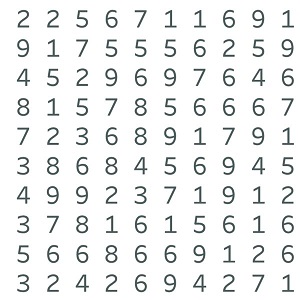
Count the 9s
How many 9s? Count them. Take 10 seconds.
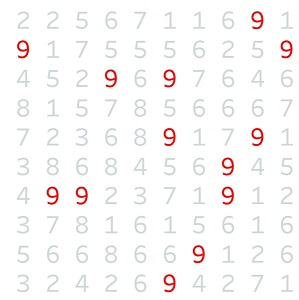
Now count the 9s
The answer is instant — your brain detected them before you consciously read any digit.
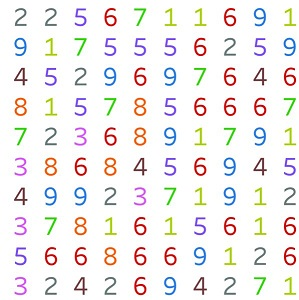
Too many colors
The pop-out effect disappears when everything competes for attention.
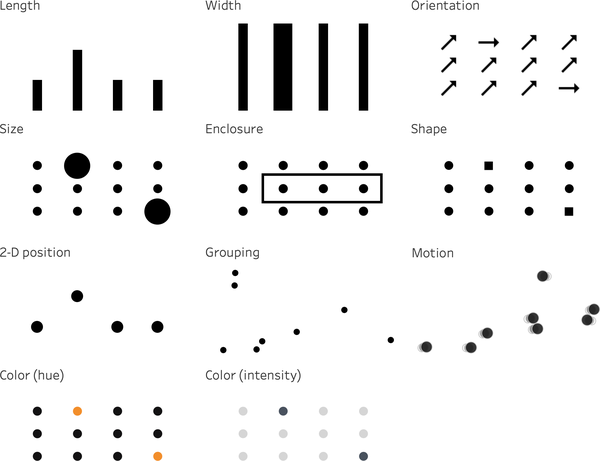
Pre-attentive attributes
The brain detects these features in under 250 milliseconds:
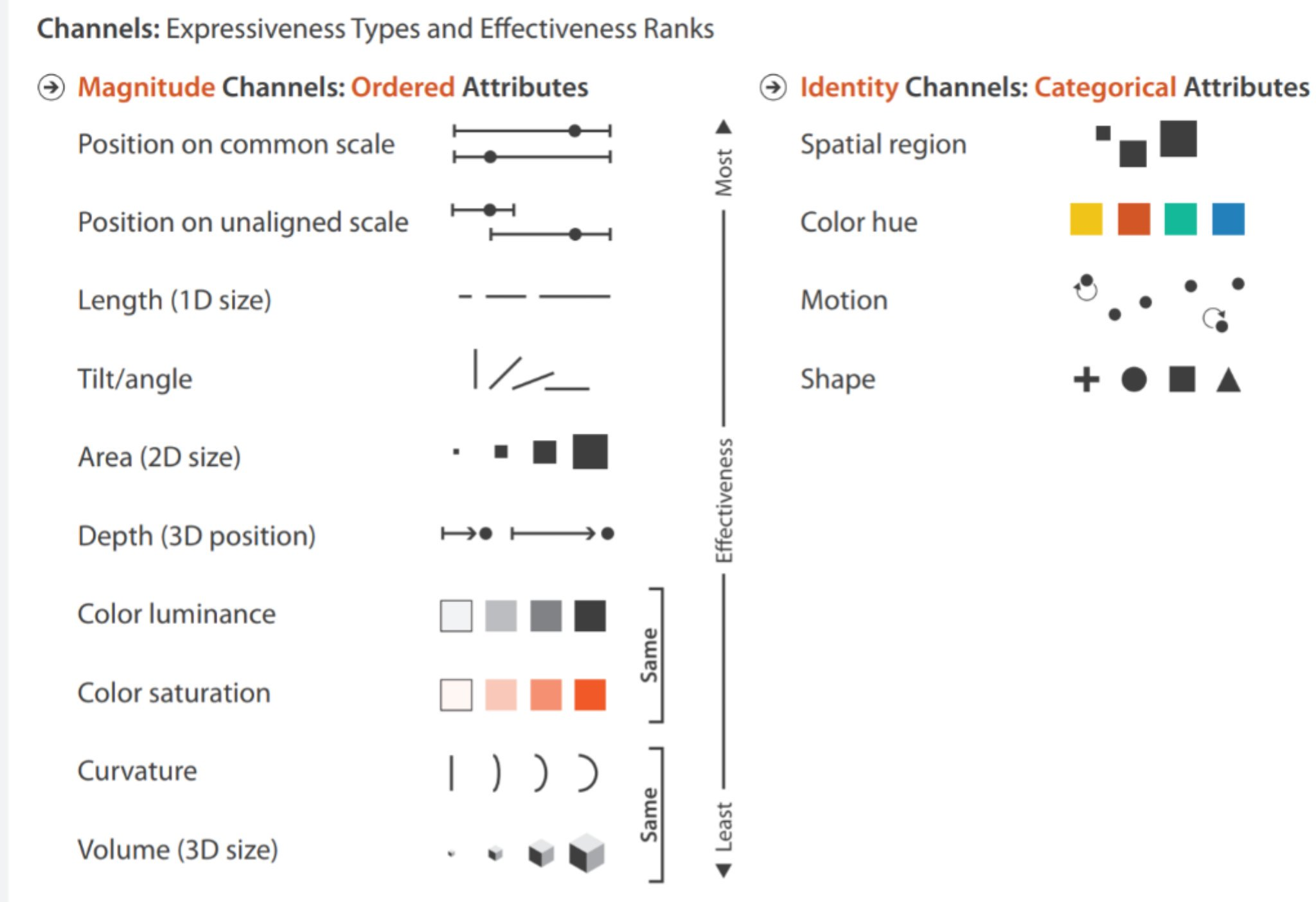
This is worth a photo — you’ll reference it all course. (CwD Ch1 Figure 1-3)
Not all attributes are equal
Magnitude channels (left) are ranked by precision. Position and length are at the top — you can tell one bar is exactly 20% longer than another. Color and size are at the bottom — you can see “darker” or “bigger” but can’t quantify how much.
Identity channels (right) encode categories. Spatial region, color hue, and shape tell you “this is different from that.”
This ranking explains most chart design rules.
Data is not reality
Two quotes
“All models are wrong, but some are useful.”
— George Box, statistician
“Plans are useless, but planning is indispensable.”
— Dwight Eisenhower
What do these have in common? And what does either of them have to do with data?
Data and reality are not the same thing
Every dataset is a model — a simplified, incomplete representation.
It records what was observed, reported, and stored, not what actually happened.
That gap is always there. The question is how big it is and whether you’ve thought about it.
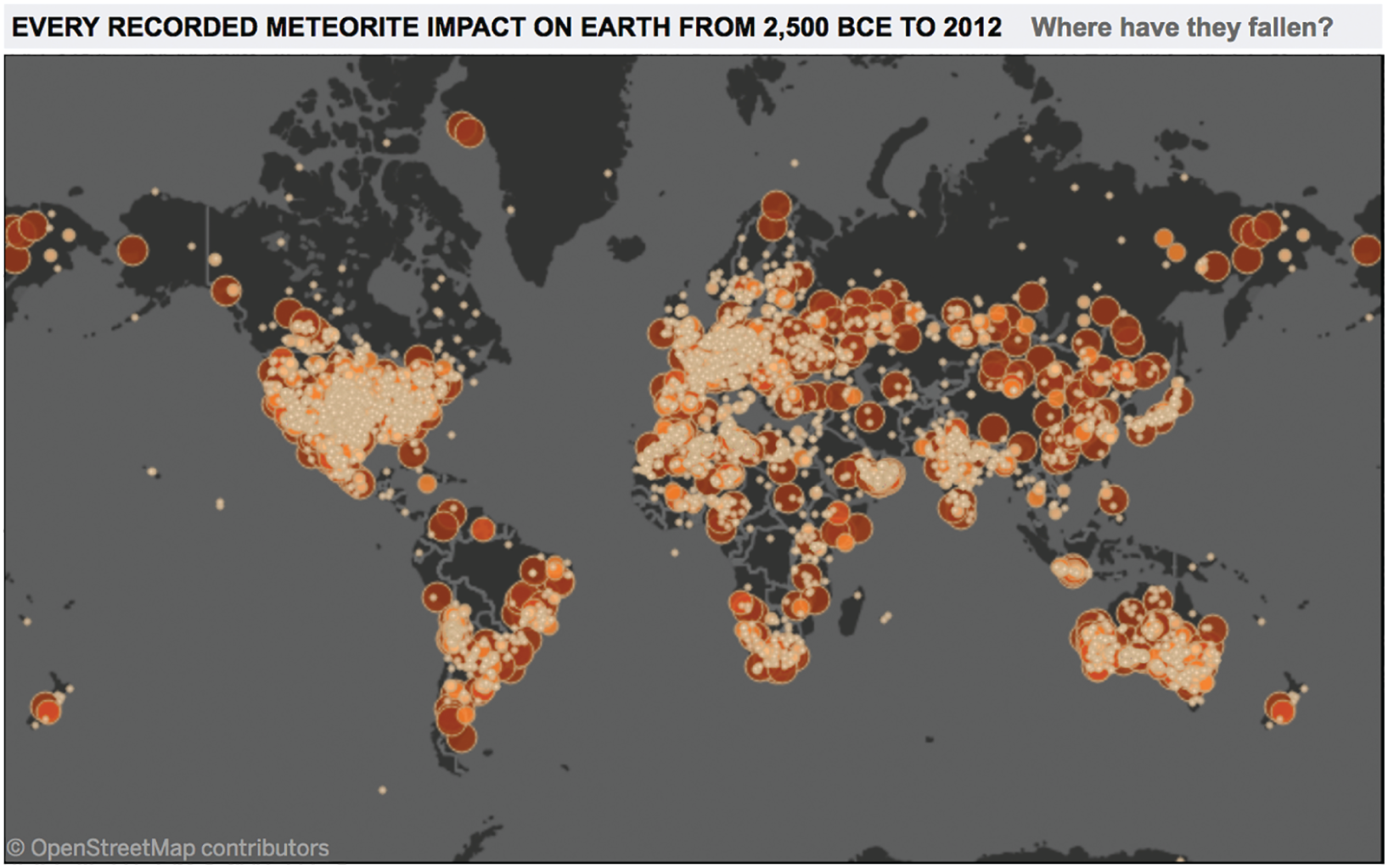
Where meteorites fall
What pattern do you see?
A map of observation
The clusters match population density and scientific institutions.
This map shows where someone was standing nearby, noticed a meteorite, and reported it to a database.
The data is real. But a perfectly accurate visualization of the data tells a story about record-keeping — about where scientific institutions exist and where people live.
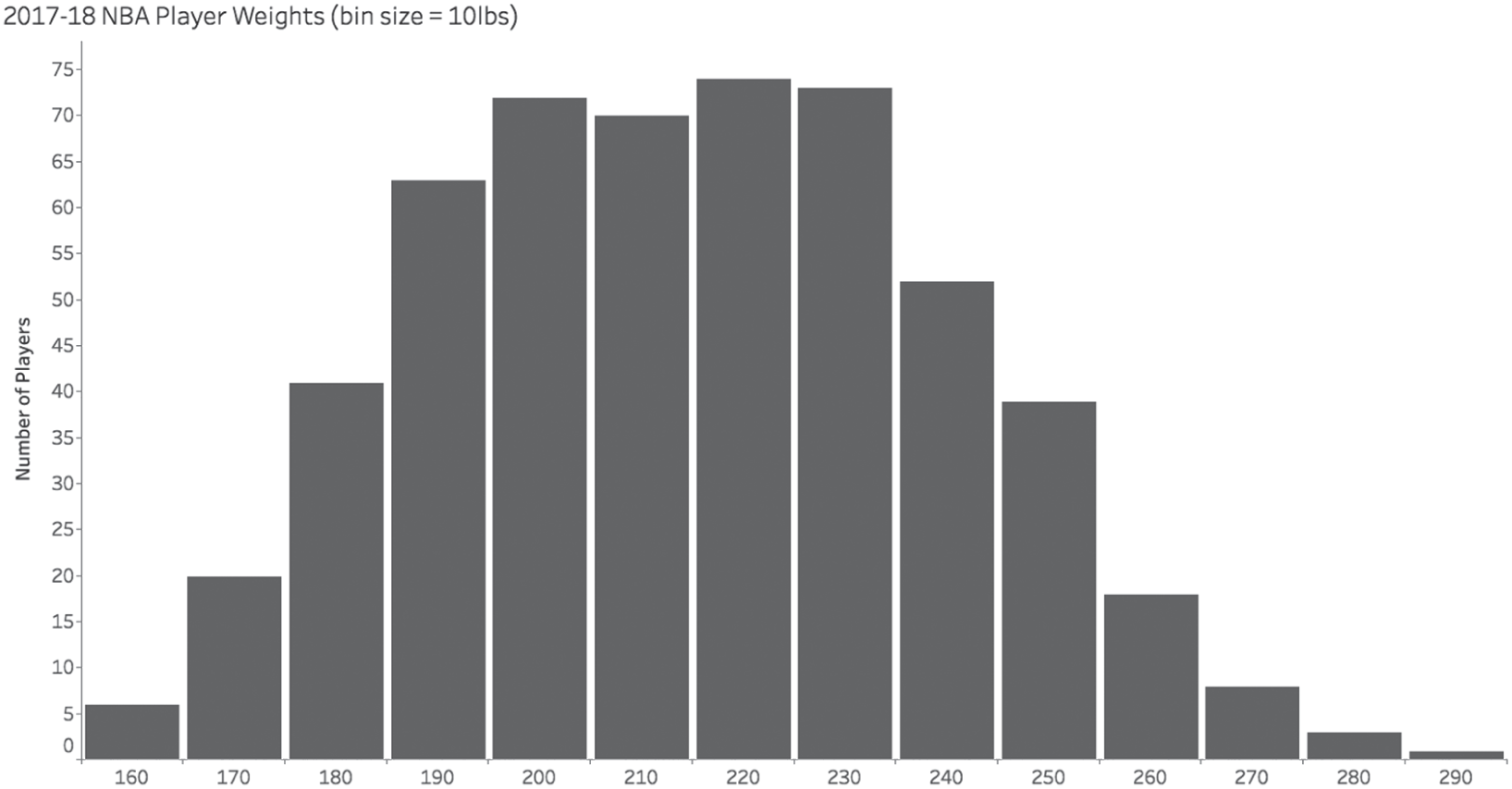
Human-entered data looks fine at a distance
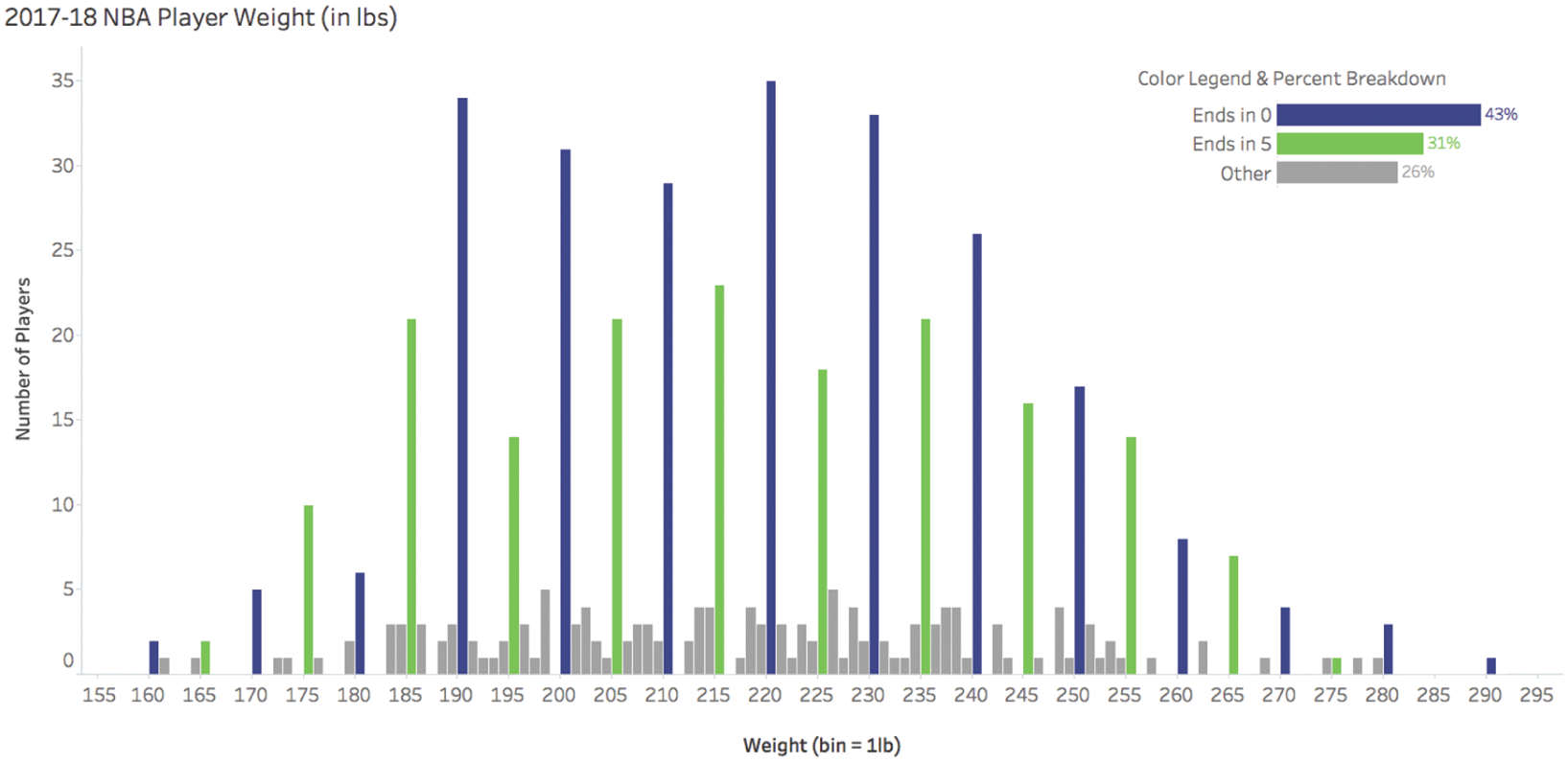
NBA player weights at 10-pound bins. Looks smooth, looks normal. Nothing suspicious.
Zoom in and the rounding appears
At 1-pound bins: 43% of entries end in 0, and 31% end in 5. Only 26% fall on other digits.
Nobody weighs exactly 200.0 pounds. These are human-entered approximations.
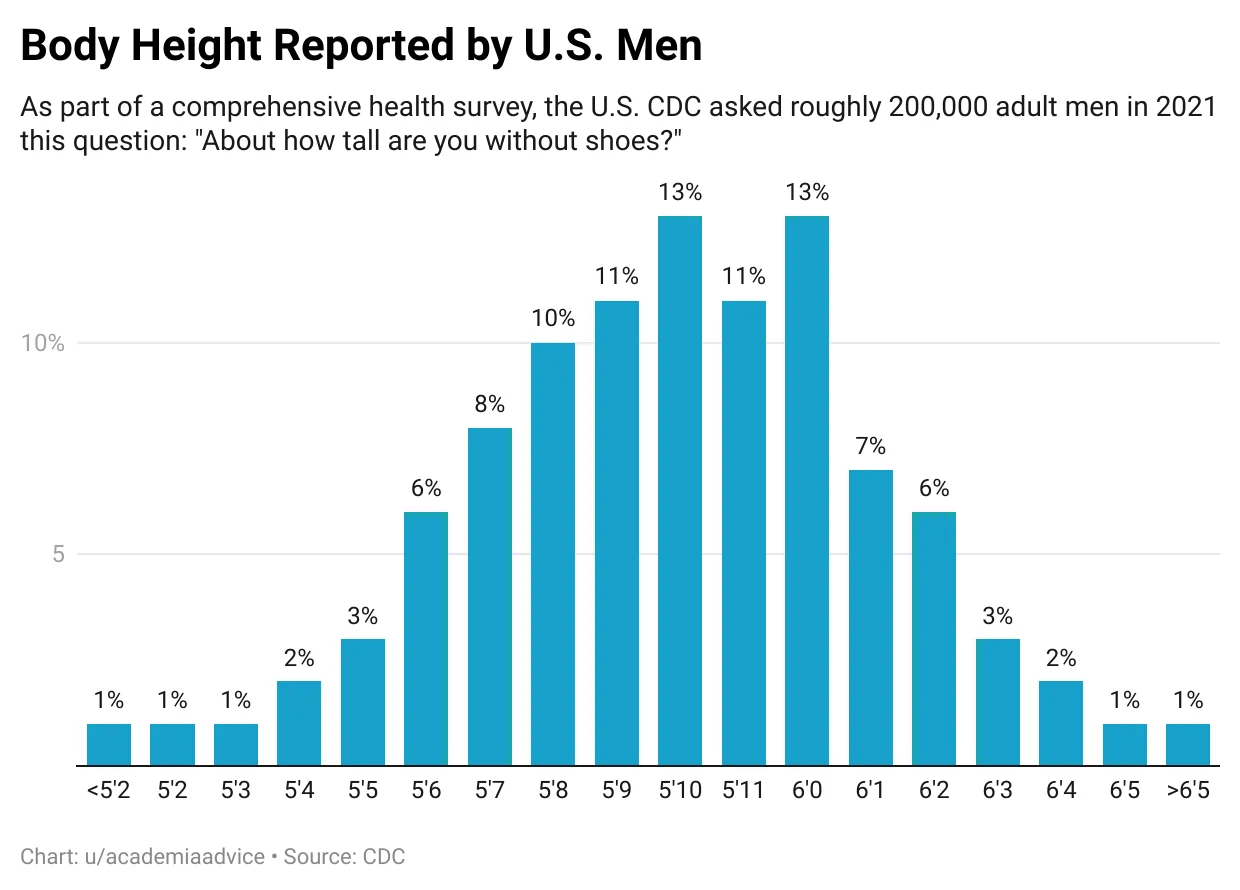
The same pattern in self-reported height
CDC survey, ~200,000 U.S. men, 2021. Spikes at 5’10”, 5’11”, 6’0” — people round up to the nearest “nice” number.
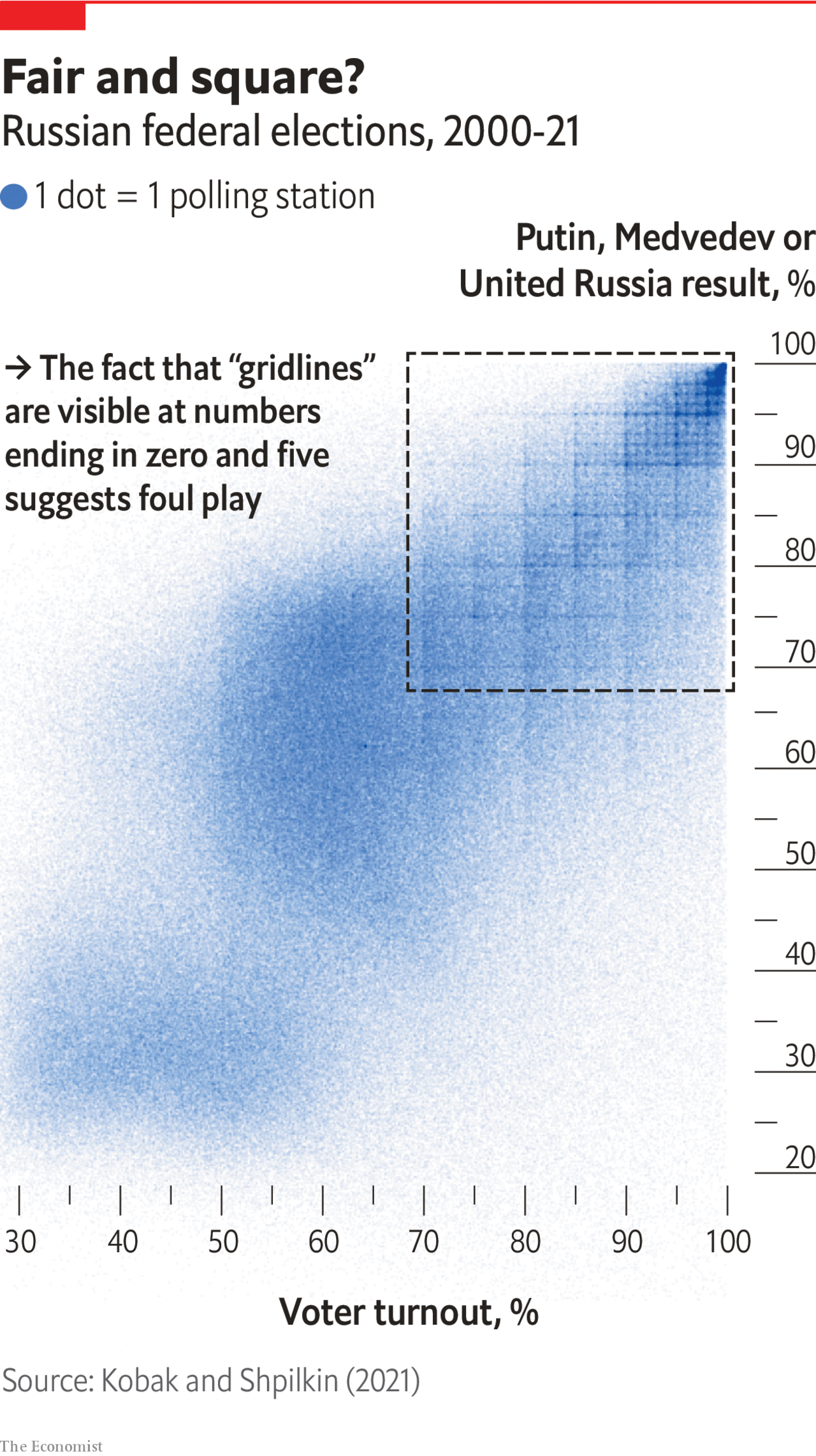
When rounding reveals something bigger
One rule before any analysis
Ask: what process generated this data?
Who collected it? How? Why?
The answer shapes what you can and can’t conclude.
You built a Profit Margin column last week by dividing Profit by Sales. That assumes both numbers are correctly recorded. In the Superstore dataset they are — it’s clean sample data. In a real company, Sales might be recorded at the point of sale, but Profit might be calculated monthly with estimated costs.
Audience and purpose
Before you build anything.
Exploratory vs. explanatory
Exploratory analysis is what you do at your desk. You filter, pivot, make 20 charts, try different angles. Most of what you try leads nowhere.
Explanatory analysis is what you present. The 2–3 findings that matter, with context and a recommendation.
Storytelling with Data calls this “opening 100 oysters to find 2 pearls.” Your audience wants the pearls. They don’t want to watch you open oysters.
The most common mistake in junior analyst work: presenting the exploration instead of the conclusion.
Three questions before you build
WHO
Who specifically will use this?
What do they already know?
What do they care about?
WHAT
What action should they take?
Approve a budget? Change a process? Investigate a problem?
HOW
How does data support the point?
Data is evidence for your recommendation.
The Big Idea
Distill your message to one sentence with three properties:
It states your unique point of view
It conveys what’s at stake
It’s a complete sentence — not a topic, not a title
Type
Example
Topic
“Shipping performance.”
Title
“Q4 shipping delays.”
Big Idea
“Q4 shipping delays cost us $200K in refunds and we need to switch carriers before peak season.”
Write a Big Idea
Situation: Your manager asks you to look into customer returns.
Your finding: 60% of returns come from one product category.
Write one sentence that includes:
your point of view (what you think is going on)
what’s at stake (why it matters)
a recommended action (what to do about it)
Five Whys: dig past the surface request
Sometimes what the stakeholder asks for isn’t what they actually need.
“I need to know how many students we have.”
Why? “To plan room assignments.”
Why? “Building C renovation — we’re losing three classrooms.”
Why does that affect assignments? “Some classes might not fit.”
What do you actually need? “Which classes won’t fit in the remaining rooms after renovation.”
The original request would have produced a single number. The real need requires enrollment by class, room capacity, and a comparison.
Choosing the right visual
Sometimes you don’t need a chart
If you have one or two numbers, just make the number big.
The KPI tiles at the top of every business dashboard follow this pattern: one big number, a comparison, and a label.
Tables vs. charts
Table — verbal system, cell by cell. Slow, precise. Use when exact numbers matter.
Chart — visual system, patterns at a glance. Fast, approximate. Use for trends and comparisons.
Heatmap — both: exact numbers + color patterns. Adding a color scale in a spreadsheet builds a heatmap.
Bar and line charts
Bar charts encode value as length — the most precise attribute.
Horizontal for categories, vertical for time
Always start at zero — truncated bars lie
Line charts encode value as position, change as slope.
Use for continuous data (almost always time)
Slope = rate of change
Don’t connect categories with lines
Zero baseline rule
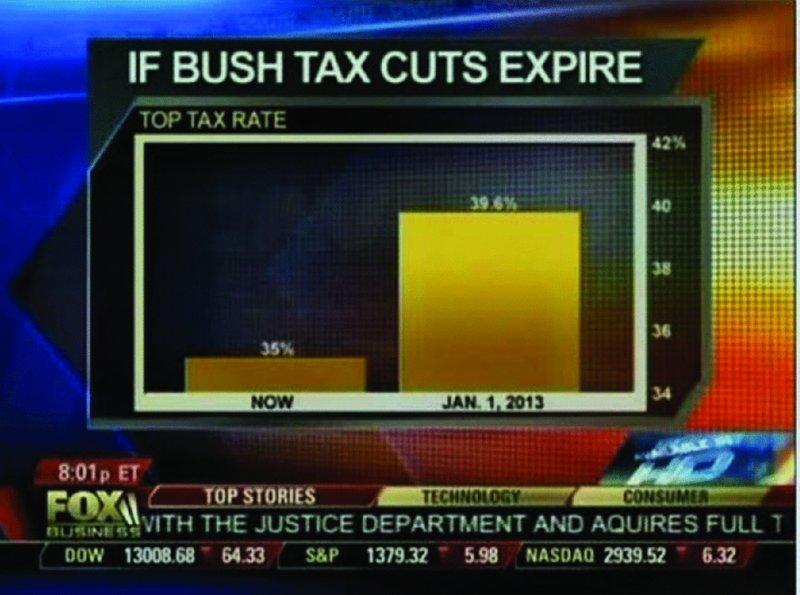
This aired on Fox News. What’s wrong with it?
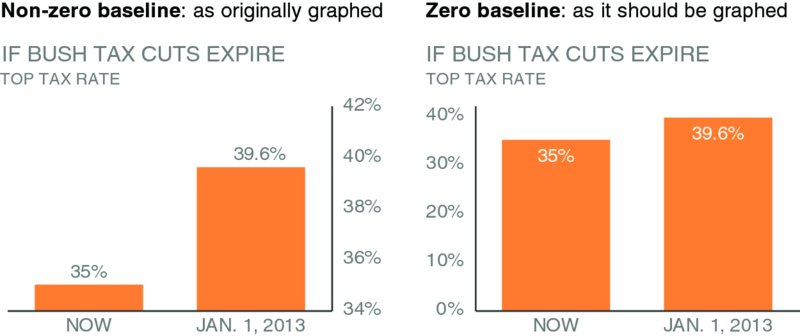
Non-zero vs. zero baseline
Left: y-axis starts at 34% — the change looks like a 460% increase.
Right: y-axis starts at 0 — the change is actually 13%.
The deception works because our brains read bar length automatically.
What fails and why
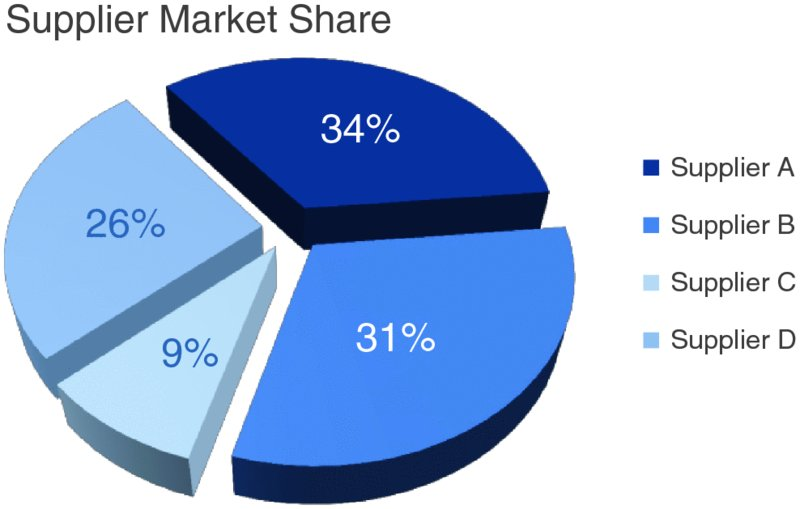
Pie charts — angle and area are imprecise. You can spot 25% and 50%, but 31% vs. 34%?
3D charts — shadows and perspective distort values. Every pixel that isn’t data is noise.
Dual y-axes — two scales on one chart imply false correlations and confuse the reader.
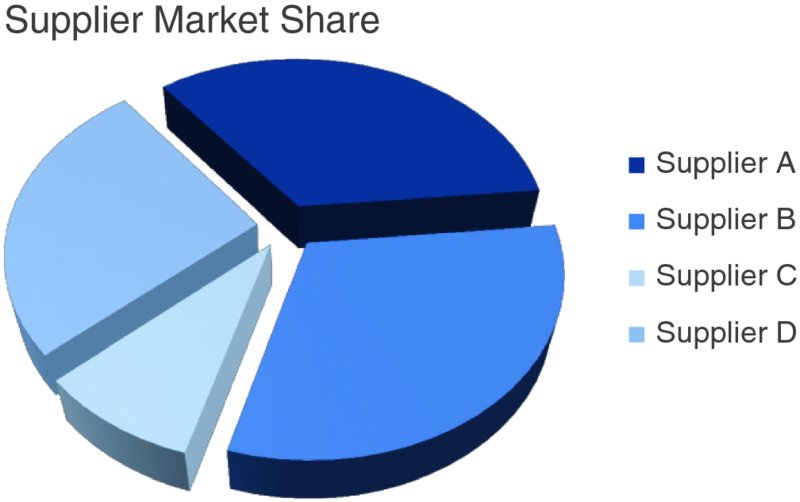
Pie chart: which supplier is bigger?
Can you tell which supplier has the largest share?
What about second largest?
How confident are you?
Add labels — does it help?
Now you can read the numbers: 34%, 31%, 26%, 9%.
But if you need labels to understand the chart, the chart isn’t doing its job.
You’re reading a table arranged in a circle.
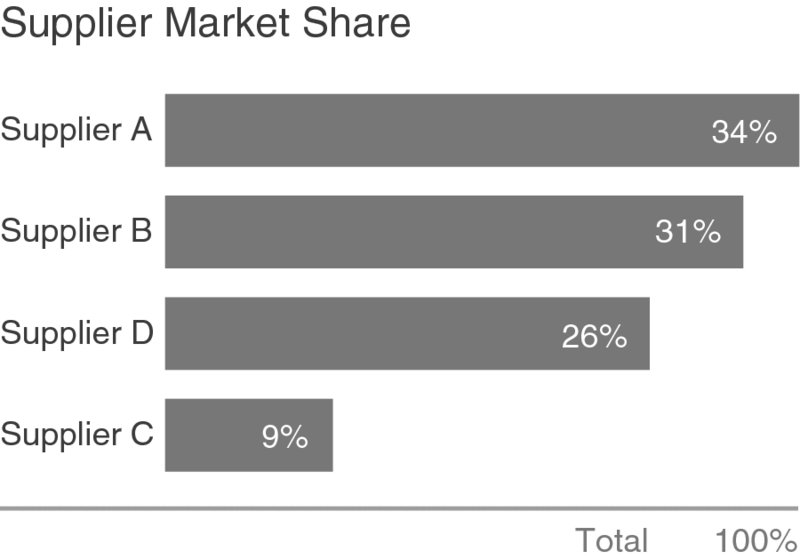
Same data as a bar chart
Same data. You can see the ranking without reading any labels.
Bar chart uses length (most precise attribute). Pie chart uses angle and area (least precise).
Color as a design system
Type
Purpose
Example
Sequential
Light → dark for low → high
Heatmaps, choropleth maps
Diverging
Two colors from a midpoint
Profit/loss, above/below target
Categorical
Different hues for groups
Product lines, regions
Highlight
One color, rest gray
Drawing attention to one bar
Alert
Bright color for warnings
The check-engine-light from Week 1
Color accessibility
About 8% of males and 0.4% of females have some form of color vision deficiency — mostly difficulty distinguishing red from green.
In this room, that’s statistically 1–2 people.
Practical rule: don’t encode meaning with red vs. green alone.
Use blue vs. orange instead, or add a second channel (shape, label, pattern) so the chart still works without color.
What’s ahead
This week in practice
We’ll build a proto-dashboard in a spreadsheet — charts, conditional formatting, lookup formulas, structured layout.
It won’t be Tableau. But you’ll see how all the pieces connect: data in one sheet, analysis in another, a summary page someone else can read.
Every BI tool — Tableau, Power BI, Looker — does the same things under the hood. Spreadsheets make the mechanics visible.
Reading assignments
Everyone should read:
SWD Ch1 — audience, Big Idea, storyboarding. The frameworks from today, in full detail.
ADP Ch2 — the data-reality gap. More examples and a systematic framework.
If you haven’t taken data visualization:
SWD Ch2 — chart types, what to avoid. The full chart-by-chart guide.
BBoD Ch1 — pre-attentive attributes, color theory, encoding.
If you have taken data visualization:
CwD Ch1 — the cognitive science behind pre-attentive processing.
CwD Ch2 — data types, requirement gathering, the Five Whys.
Starting Week 3, quizzes will include reading material.